


US Public Weather
3.7289.00 Reviews
App Specs
- Version
- 2.51
- Updated On
- License
- Free
- Downloads
- 100,000+
- Developer
- MeteorologyMan
- Categories
- Weather
- Platform
- Android
Screenshots
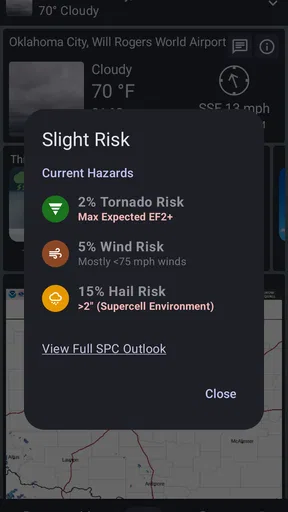
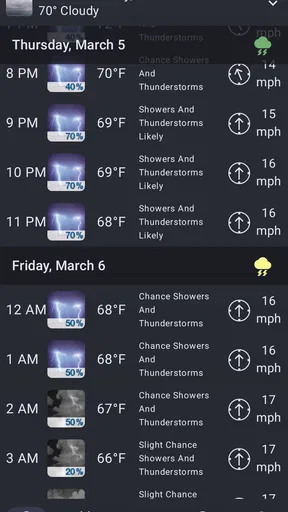
 Analysis by AppCompare
When I open US Public Weather for the first time, I want one simple thing: a clear answer to whether the weather will change my plans. This free US-focused weather app is built around forecasts, alerts, and radar using National Weather Service data. Its appeal is practical rather than flashy: it aims to help me decide what to wear, when to leave, and whether to keep an eye on conditions nearby.
If you are new to weather apps, the first useful step is to choose a location you actually care about, then look at today’s conditions before exploring every screen. That might be home, work, or the place you are heading later. Starting with one familiar location makes it easier to judge whether the forecast is useful to you, and it avoids turning setup into a project.
What to expect from a US-focused forecast
The app is from MeteorologyMan, and its focus on US weather makes it a more natural fit for people who want information relevant to places in the United States than for anyone looking for a worldwide travel-weather tool. The National Weather Service source is a meaningful part of that identity. I would treat the app as a practical way to check conditions and follow changing weather, not as a replacement for official emergency instructions when a dangerous situation develops.
Its basic promise is easy to understand: check a forecast, look at radar, and use alerts to stay aware of conditions. The experience is most valuable when those pieces answer different questions. A forecast helps with broad planning, radar can help me judge what may be approaching, and an alert can prompt me to check again when conditions matter. I find that combination more useful than repeatedly opening a single screen and hoping it tells me everything.
The app is free to install and is rated for Everyone. It has an average rating of 3.8 from around 400 ratings, with over 100,000 installs. That gives a newcomer some context about its audience, but it does not tell me whether the layout or style will suit them personally. The current version is 2.05, and the app requires Android 11 or later, so an older Android device may not be able to run it.
First setup: make one location useful
After installing, I would begin by setting up a location that reflects an ordinary day rather than adding every place I might visit someday. If you regularly split your time between home and work, those are sensible first choices. If you are about to travel, add the destination as well, then use the locations deliberately: check the place you are leaving before departure and the place you are heading to before making decisions there.
When an app asks about location access, I prefer to consider what I actually need. A manually selected place can be enough if I mainly check a few familiar areas; location access may be more convenient if I want conditions for wherever I am. The right choice depends on your routine, so there is no need to grant more access than feels useful. If the displayed place is not the one you intended, check the selected location before assuming the forecast itself is wrong.
Worth Reading Before You Choose

EA SPORTS FC Mobile 26 Is a Bigger Football Game, but It Takes Time

Flipboard Shows What News Apps Must Do Beyond the Feed

Switching to Android Auto Means Rethinking Your Driving Routine

Google Calendar Makes a Crowded Week Easier to Manage

Ludo King Makes the Most of the Minutes Between Plans

Baby Panda World Brings Quick Play to Modern Phones, but Its Game Library Feels Busy
For a first meaningful test, check the forecast for today, then compare it with what you can see outside. Follow with the radar if rain or storms are relevant, and notice whether the view helps you understand the direction and timing of changing conditions. This simple check gives you a feel for how the app presents information without requiring you to configure every option on day one.
Use forecasts, radar, and alerts for different decisions
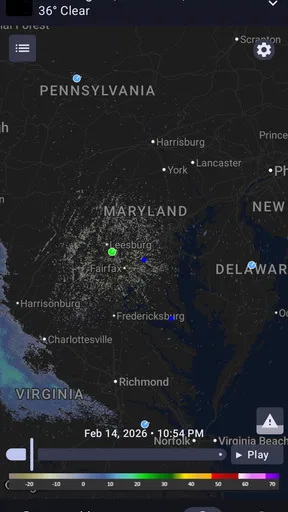
A forecast is the place I would start when deciding whether to carry a coat or move an outdoor plan. Radar serves a different purpose: it offers a visual way to inspect weather patterns as they develop. I would not treat a radar image as a precise promise about exactly when rain will reach my doorstep. It is more useful as one clue alongside the forecast, especially when I can check it again before leaving.
Alerts are most helpful when they match a decision I can act on. A warning that prompts me to reconsider a drive or bring outdoor equipment inside is more valuable than a stream of notifications I learn to ignore. I would choose the conditions that genuinely affect my plans and keep the alert setup focused. If notifications are too frequent or too broad, reviewing which ones matter is a better fix than switching them all off and losing the alerts you wanted.
Here is a realistic routine: before a morning commute, I check the forecast for both home and the destination, then look at radar if rain could affect the route. If conditions look unsettled, I check again closer to leaving instead of relying on a single glance made much earlier. That small habit is more useful than trying to predict the whole day from one screen, and it makes the app part of a decision rather than a background source of noise.
Where it fits among weather apps
Compared with a phone’s default weather app, this one is worth trying if its US-weather focus, radar, and alert tools line up with how you plan your day. The built-in option may still be more convenient if you only want a quick temperature check and already like its glanceable display. I would not switch just for the sake of having another app; I would compare the screens using the same location and the same practical question, such as whether I need a rain layer this afternoon.
It also suits a different habit from checking a general search result. A quick search can answer a one-off question, while a dedicated app makes it easier to return to chosen locations and use weather information as part of a routine. On the other hand, people who need global coverage for frequent international trips may prefer a service designed around worldwide locations. The right choice depends less on the number of screens than on whether the app covers the places and decisions that matter to you.
Common points of confusion and honest trade-offs
Weather information can change, and a forecast should be treated as guidance rather than a guarantee. Radar is visual context, not certainty about what will happen at one exact address. When the stakes are high, I would check current official guidance and follow local emergency instructions instead of relying on any single app notification. That is not a knock on this app; it is a sensible boundary for all consumer weather tools.
Another practical trade-off is the business model. The app is free, but it offers in-app purchases ranging from $0.99 to $9.99 per item. I would explore the free experience first and only consider a purchase if I encounter something I specifically want. A free download does not mean every optional item is included, so it is worth checking the purchase prompt before confirming anything.
The minimum Android requirement is also worth checking before you spend time setting things up: the app needs Android 11 or later. That makes it a poor fit for someone using an older Android phone that cannot meet the requirement. Its US focus is another clear boundary. For people who mainly need international forecasts, or who want only a bare, instant glance at temperature, a different weather option may fit better.
Who is likely to get the most from it?
I would recommend trying the app if you live in the United States, regularly make plans around changing weather, and like having forecast, radar, and alerts available together. It is especially relevant for someone who checks more than one local area, such as a commuter, a caregiver keeping an eye on a family member’s town, or a person deciding whether an outdoor commitment needs a backup plan. The useful question is not whether you will inspect every feature; it is whether these tools help with a decision you make often.
It may be less appealing if your priority is a highly polished, minimal screen with nothing beyond the current conditions, or if you expect a weather app to make an uncertain forecast feel exact. I also would not rely on it as my only source during severe weather. For an ordinary daily check, though, the combination of US-focused information and tools for following conditions gives it a more purposeful role than a temperature-only shortcut.
Getting Started with US Public Weather
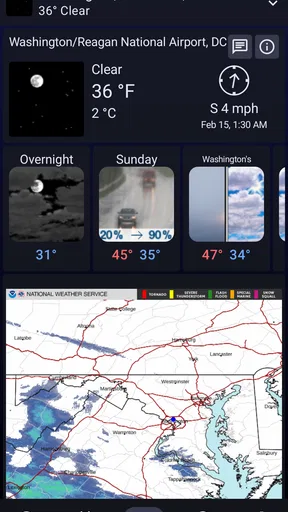
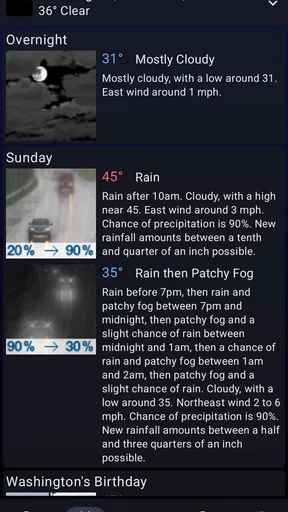
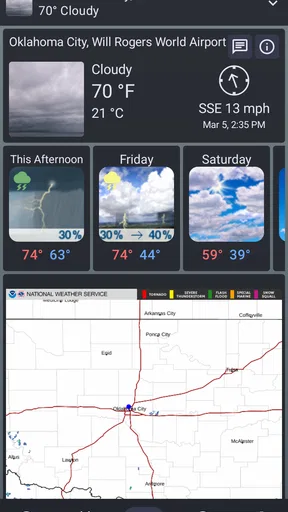
First things first, downloading the US Public Weather app is a breeze. Available on both Android and iOS, the installation process is quick and painless. Once you open the app, you’re greeted with a clean, easy-to-navigate interface. The layout is intuitive, with current weather conditions displayed prominently on the home screen. No frills, no fuss—just the weather data you need at a glance.
Features to Keep You in the Know
The app offers a wide array of features that cater to every weather need you might have. Want to plan a picnic this weekend? Check the detailed 7-day forecast to ensure sunny skies. Need to know if you should grab an umbrella before heading out? The hour-by-hour breakdown has got you covered.
One of the standout features is the real-time radar. This tool allows you to see weather patterns as they develop, giving you a bird’s-eye view of incoming storms or clear skies. It’s especially handy for those living in areas prone to rapid weather changes. Plus, the radar is updated frequently, so you’re always in the loop.
Customization and Alerts
Customization is another strong suit of this app. You can set up alerts for specific weather conditions, ensuring you never get caught off guard. Whether it’s a severe thunderstorm, snowstorm, or just a particularly windy day, the app will send you a notification to prepare accordingly.
You can also personalize the app to show weather data for multiple locations. This is perfect for keeping tabs on weather conditions for your home, workplace, or any travel destinations. It’s like having a personal weather station right in your pocket.
User Experience and Design
The user experience is smooth and seamless. The app’s design is both modern and functional, with a pleasing color palette that’s easy on the eyes. Navigation is straightforward, making it a breeze to switch between different features and settings.
Even if you’re not a tech-savvy individual, you’ll find the app’s layout intuitive. Each feature is accompanied by clear instructions, ensuring you can make the most of what the app has to offer without any hassle.
Why You’ll Love US Public Weather
Beyond its practical features, what really sets the US Public Weather app apart is its reliability. The data is sourced from trusted meteorological services, ensuring accuracy and timeliness. Whether you're planning a road trip or just trying to figure out if you need that extra layer, you can trust this app to guide you.
Moreover, the app doesn’t bombard you with ads. While some free apps can become a nuisance with incessant advertising, this one keeps it to a minimum, allowing you to focus on what truly matters—the weather.
Final Thoughts
In a world where weather impacts our daily lives more than we often realize, having a reliable weather app is essential. The US Public Weather app delivers on its promise to provide accurate, up-to-date weather information in an easy-to-use package. Whether you're a weather buff or just someone who likes to stay prepared, this app is a valuable tool to have at your fingertips.
So, next time you’re heading out the door, make sure to check the US Public Weather app—it might just save your day from an unexpected weather mishap!
Pros
- Accurate local forecasts.
- User-friendly interface.
- Customizable weather alerts.
- Real-time radar updates.
- Supports multiple locations.
Cons
- Ad-heavy experience.
- Occasional loading delays.
- Limited offline functionality.
- Some features require premium.
- Data usage can be high.
FAQs for US Public Weather
What features does the US Public Weather app offer?
The US Public Weather app provides detailed weather forecasts, including hourly and weekly predictions, real-time alerts, and radar imagery. Users can access personalized weather updates for multiple locations, ensuring they stay informed about conditions in their area or anywhere they choose. The app also includes widgets for quick home screen access.
Is the US Public Weather app free to use?
Yes, the US Public Weather app is free to download and use. However, it may offer in-app purchases or advertisements to support development costs. These features often include premium content, such as ad-free experiences or advanced data options, enhancing the overall user experience.
How accurate is the weather information provided by the app?
The US Public Weather app sources its data from reliable meteorological services, ensuring high accuracy in its forecasts. While no weather prediction can be 100% accurate, users generally find the app’s updates and alerts dependable. It is advisable to cross-check with local news or other weather services for critical events.
Can I customize notifications and alerts in the app?
Yes, users can customize notifications and alerts in the US Public Weather app. You can set alerts for severe weather conditions, daily forecasts, or temperature changes. The app allows you to tailor these settings to your personal needs, ensuring you receive only the information relevant to you.
Does the US Public Weather app require an internet connection?
The US Public Weather app requires an internet connection to provide real-time updates and accurate forecasts. While some basic information may be available offline, such as previously downloaded data, for the most current and precise updates, an active internet connection is necessary.


